
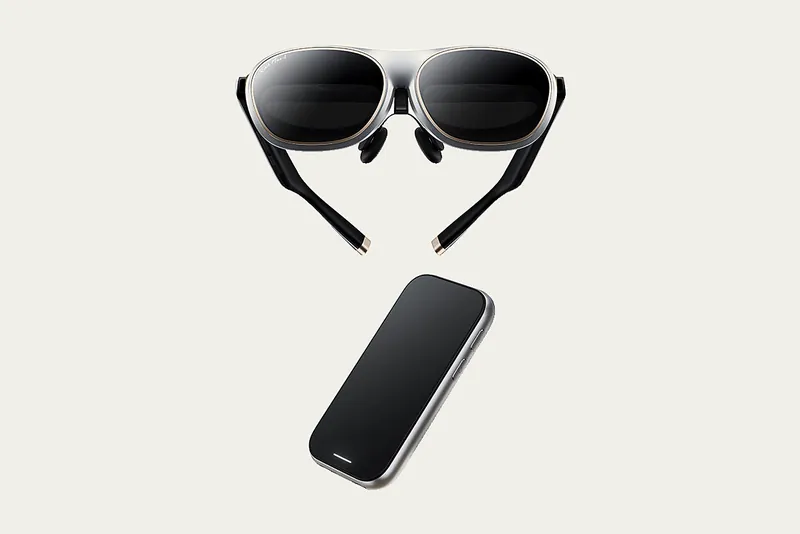
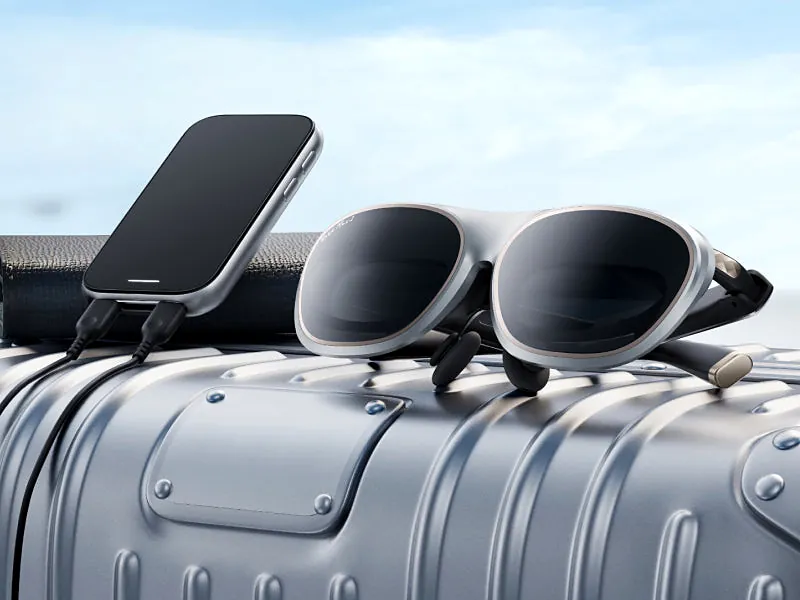
Rokid AR Spatial in one paragraph: it’s a bundle of the Rokid Max 2 display glasses and the Rokid Station 2, a pocket-size Android-based hub with its own battery. The glasses give you a big private virtual screen. The Station 2 adds head-tracked (3DoF) floating windows, up to three apps side by side, Wi-Fi apps and Bluetooth keyboard and mouse support. It’s $399 at Rokid's US store (page shows a $549 regular price; as of Oct 29, 2026). Buy it if you want a portable private cinema and a lightweight multi-window setup in one case. Skip it if you only need to mirror your phone or laptop: the Max 2 glasses alone do that for less.
This is a spec and public-review roundup, not a hands-on review. Specs come from Rokid’s official pages, checked on October 29, 2026, and real-world findings are credited to the outlets that tested the hardware: How-To Geek, TechRadar and XDA. I spent years in consumer-hardware PR, including as PR director at a consumer camera company, and I currently work at the company that makes this product. So I’m not a neutral party. Every claim below links to a source, and the downsides reviewers found are listed as plainly as the upsides.
Check Rokid AR Spatial priceI may earn a commission if you buy through this link.Quick verdict
- Best for: travelers and commuters who want a big private screen for movies, games and streaming, plus a simple multi-window workspace, without carrying a laptop.
- Price: $399 at Rokid's US store (page shows a $549 regular price; as of Oct 29, 2026). Rokid sells the Max 2 glasses on their own for $399 list; $249 on sale at Rokid's US store (as of Oct 29, 2026), so on today’s prices the Station 2 effectively adds $150.
- What reviewers liked: sharp, colorful picture, comfortable fit for hours, and per-eye nearsightedness dials. How-To Geek scored the bundle 8/10.
- What reviewers didn’t like: a 50° field of view that can feel limiting, middling speakers, reflections from the birdbath optics, an audible fan on Station 2, and IPD adjustment that only works through Station 2.
- Skip it if: you just want phone or laptop mirroring, you need more than -6.00D or astigmatism correction without inserts, or you want hand-tracked, Vision Pro-style AR.
What’s in the Rokid AR Spatial bundle?
The bundle is two devices that work together:
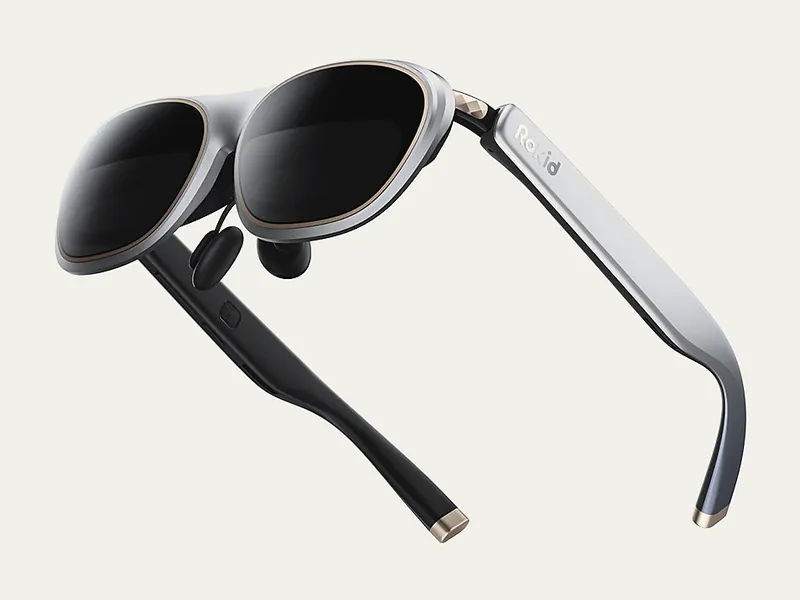
- Rokid Max 2 glasses. Display glasses with micro-OLED screens and birdbath optics, per How-To Geek. They have no battery or chip of their own and draw power from whatever they’re plugged into over USB-C. XDA and TechRadar both put them at 75 g (2.65 oz).
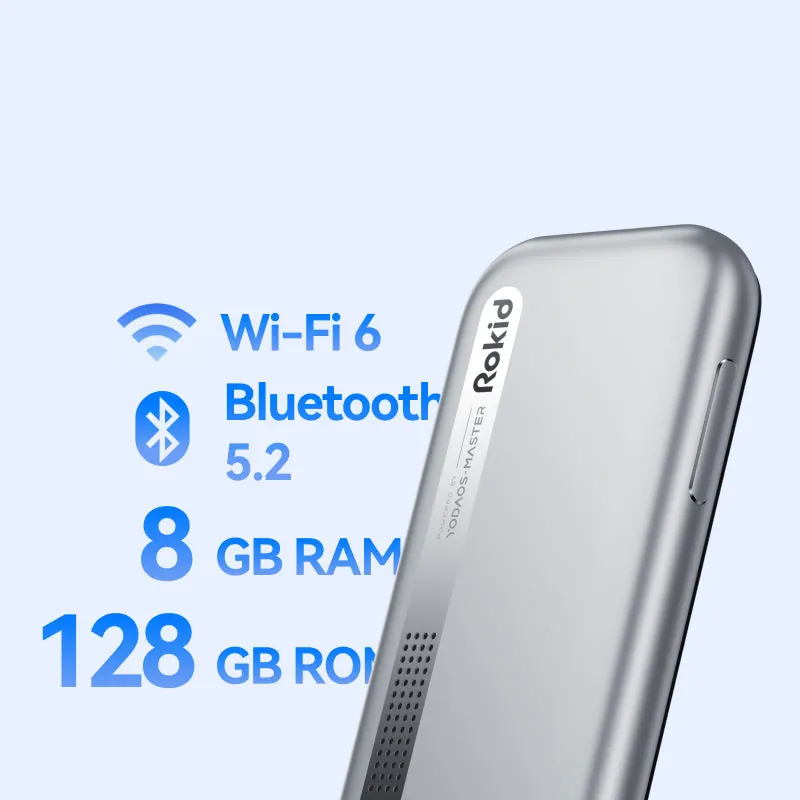
- Rokid Station 2. A phone-shaped hub with a touchpad that runs Rokid’s YodaOS-Master. Rokid lists 8 GB RAM, 128 GB storage, Wi-Fi 6, Bluetooth 5.2, a 5,000 mAh battery and 18 W charging. XDA reported a Snapdragon 6 Gen 1 chip inside. It’s the piece that turns the glasses into a “spatial” device.
How-To Geek lists what’s in the boxes: the glasses, a black cover, nose pads, a USB-C to USB-C cable, a carrying case and a cleaning cloth for the Max 2, and a protective case and USB-C cable for the Station 2. It also notes the whole system fits inside the included glasses case.
Rokid AR Spatial specs
| Spec | Rokid AR Spatial (Max 2 + Station 2) |
|---|---|
| Display | Micro-OLED, birdbath optics |
| Resolution | 1920 × 1200 per eye (Max 2 alone: 1920 × 1080 by default) |
| Virtual screen | Up to 300 inches, per Rokid |
| Field of view | 50° |
| Refresh rate | 60–120 Hz |
| Brightness / contrast | 600 nits / 100,000:1 |
| Spatial features | 3DoF, up to 3 virtual screens |
| Vision adjustment | 0.00D to -6.00D myopia dials, IPD adjustment |
| Hub | Station 2: YodaOS-Master, 8 GB RAM, 128 GB storage |
| Wireless | Wi-Fi 6, Bluetooth 5.2, keyboard and mouse support |
| Battery | Station 2: 5,000 mAh, approx. 5 hours, 18 W charging |
| Controls | Ray, touch, voice and remote control |
| Audio | Near-ear directional speakers, built-in microphone |
| Glasses weight | 75 g (XDA, TechRadar) |
Source: Rokid AR glasses lineup and product page, checked October 29, 2026, unless noted. Full source list on the Rokid AR Spatial spec page.
How to read these numbers. The “300-inch” screen is a simulated size at a set viewing distance. How-To Geek says it’s viewed “from 20 feet away” and that “my brain was never fooled into thinking it was that big,” though the screen did seem slightly larger than on other glasses it tried. The 600-nit figure is Rokid’s own, and Rokid’s pages don’t say how it was measured. One more detail from How-To Geek: with Station 2 at 1920 × 1200, the refresh rate is 90 Hz, not 120 Hz.
Rokid AR Spatial vs Max 2: is Station 2 worth it?
This is the real buying decision. Rokid’s lineup page sums it up: choose the Max 2 “for direct display from a compatible device,” and AR Spatial “for Max 2 plus Station 2, including spatial screens and multi-app experiences.”
| Max 2 alone | AR Spatial (Max 2 + Station 2) | |
|---|---|---|
| Price (Rokid US store, Oct 29, 2026) | $399 list; $249 on sale at Rokid's US store (as of Oct 29, 2026) | $399 at Rokid's US store (page shows a $549 regular price; as of Oct 29, 2026) |
| Screen behavior | Fixed in front of your eyes; “3DoF Requires Station 2” | 3DoF: windows can stay put in space |
| Multiple windows | No, mirrors one source | Up to 3 side by side |
| Runs apps on its own | No, needs a phone, laptop or console | Yes: Google Play and Chrome, per How-To Geek |
| Power | From the connected device | Station 2’s own 5,000 mAh battery |
| Max resolution | 1920 × 1080, or 1920 × 1200 with compatible sources | 1920 × 1200 |
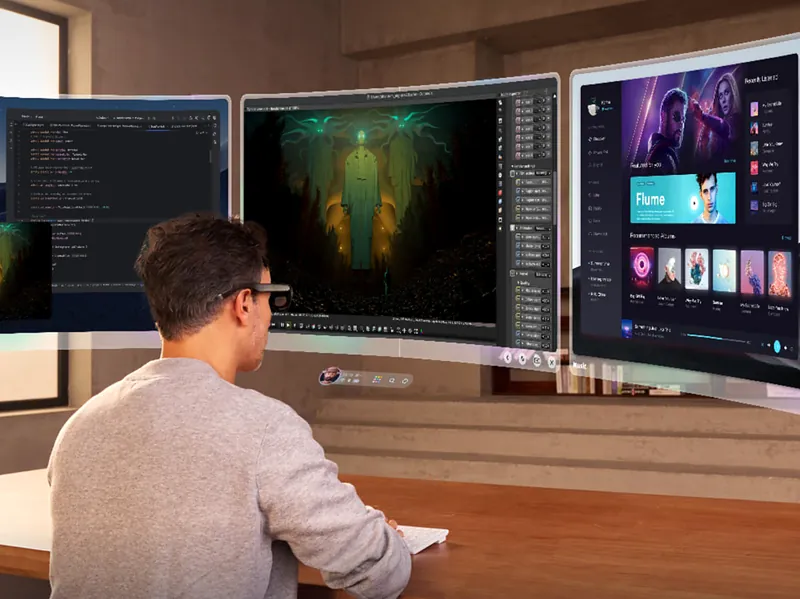
Get the bundle if you want the glasses to work without draining your phone, you like the idea of three floating windows with a Bluetooth keyboard, or you want streaming and Android apps in a self-contained kit. XDA tried a three-window setup with a browser, X (Twitter) and Outlook and said “it worked well,” while recommending a wireless keyboard and mouse for real work.
Get the Max 2 alone if your phone or laptop already has USB-C video output and you just want a big private screen. How-To Geek put it directly: “you can also pay less than this bundle if you don’t want the easier access to the spatial features.” Note that Station 2 only works with Rokid’s AR glasses, per XDA, so it isn’t a general-purpose Android box.
What reviewers liked
- Picture quality. How-To Geek found “clarity and color to be excellent” at both resolutions, with “some minor blurriness on the extreme edges.” TechRadar said the Max 2’s image “can seriously pop” with the lens cover on.
- Comfort. How-To Geek says the glasses “remain comfortable to wear even after several hours.” TechRadar says they “can be easily worn for hours at a time.”
- Built-in nearsightedness dials. A dial above each lens adjusts from 0.00D to -6.00D. How-To Geek, who has different correction in each eye, singled out the separate per-eye dials. TechRadar called the feature “a massive benefit” for people who need it.
- Station 2 performance and modes. How-To Geek compares it to “a mid-tier Android smartphone or tablet, with no notable lag or stuttering,” and describes theater mode, multi-screen with up to three apps, reading mode, wireless casting, and controller support for streaming apps like Xbox Game Pass.
What reviewers didn’t like
- Field of view. 50° is in line with rivals, but How-To Geek says it “can feel limiting,” especially for 3D content.
- Audio. TechRadar calls the speakers “middling” and suggests Bluetooth headphones on planes and trains. How-To Geek found them distortion-free but light on bass and clarity. The mic has no apparent noise filtering, so it’s for voice commands and quick calls only.
- Reflections and dimming. TechRadar says the birdbath optics can reflect “your chest into your view,” and the Max 2 has no electrochromic dimming. You use a snap-on blackout cover instead.
- Fan noise. Both How-To Geek and German site Android User noticed the Station 2 fan.
- IPD only in software. How-To Geek says Station 2 is “the only way to adjust the IPD,” and called it “a shame” that there’s no physical adjustment.
- Companion phone app. How-To Geek found the Rokid mobile app “quite buggy” on iPhone at the time of its review.
- Consoles need an adapter. HDMI doesn’t carry power, so How-To Geek says an Xbox or PS5 needs a powered HDMI-to-USB-C adapter, and compatibility “can sometimes be spotty.”
Pros
- Glasses plus a battery-powered hub in one kit
- Up to three floating windows with 3DoF (Rokid)
- 0.00D to -6.00D myopia dials per eye
- Comfortable for hours, per How-To Geek and TechRadar
- Google Play, Chrome and Bluetooth keyboard and mouse
Cons
- 50° field of view can feel limiting
- Middling speakers; bring headphones
- Birdbath reflections; no electronic dimming
- Station 2 fan is audible
- IPD adjusts only in Station 2 software
Who should buy the Rokid AR Spatial?
- Frequent flyers and commuters who want a private screen for movies and shows without holding a phone. TechRadar calls planes and trains “the best places to use these kinds of AR specs.”
- Nearsighted users within -6.00D who are tired of buying prescription inserts.
- Light multitaskers who want email, a browser and a chat window floating side by side on the go, with a pocket keyboard.
- People who’d rather not drain their phone. Station 2 runs on its own battery, rated at about 5 hours by Rokid.
Who should skip it?
- You only want phone or laptop mirroring. If your device outputs video over USB-C, the Max 2 alone covers it for less.
- You need stronger or different correction. The dials only handle nearsightedness to -6.00D. How-To Geek says stronger needs require a prescription insert.
- You want headset-style spatial computing. This is 3DoF: windows stay put when you turn your head, but Rokid doesn’t claim 6DoF positional tracking. XDA says the experience isn’t as immersive as Apple Vision Pro, though it’s “much, much lighter and cheaper.”
- You need a quiet device. Fan noise is a reported issue.
- You mostly play PS5 or Xbox. Budget for a powered HDMI adapter, and check compatibility first.
Price, shipping and returns (US)
As of October 29, 2026, Rokid’s US store lists the AR Spatial at $399, shown against a $549 “regular price,” in silver or black. Rokid’s product page says US orders over $60 get free standard shipping, returns are accepted within 30 days of delivery if items are unused, undamaged and complete (you pay return shipping on non-defective items), and eligible Rokid smart glasses carry a 1-year limited warranty. Prices change often, so check the current price before you buy.
See Rokid AR Spatial at Rokid's storeI may earn a commission if you buy through this link.Frequently asked questions
What is the Rokid AR Spatial?
Rokid AR Spatial is a bundle of the Rokid Max 2 display glasses and the Rokid Station 2 hub. The glasses show a large virtual screen; Station 2 adds 3DoF floating windows, up to three apps at once, Wi-Fi apps and Bluetooth keyboard and mouse support, per Rokid.
How much does the Rokid AR Spatial cost?
As of October 29, 2026, Rokid's US store lists the AR Spatial at $399, shown against a $549 regular price. The Max 2 glasses alone are $249 on sale ($399 list). Prices change, so check before buying.
What's the difference between Rokid AR Spatial and Rokid Max 2?
Max 2 is the glasses only: they mirror a connected phone, laptop or console and the screen moves with your head. AR Spatial adds Station 2, which gives 3DoF screens that stay in place, up to three windows, its own apps and a 5,000 mAh battery.
Does the Rokid AR Spatial work with iPhone?
Yes. The Max 2 glasses plug directly into USB-C iPhones; How-To Geek got video and audio immediately from an iPhone 16 Pro Max. Station 2 can also receive wireless screen mirroring from iOS and Android devices, per How-To Geek.
Can I use the Rokid AR Spatial if I wear glasses?
If you're nearsighted up to -6.00D, yes, without inserts: each lens has a dial from 0.00D to -6.00D. Stronger prescriptions or other corrections need a prescription insert, according to How-To Geek.
How long does the Rokid AR Spatial battery last?
Rokid rates Station 2's 5,000 mAh battery at approximately 5 hours. The glasses have no battery. Station 2 has two USB-C ports, so you can charge it at up to 18 W while using it, per How-To Geek.
Can I play PS5, Xbox or Switch on the Rokid AR Spatial?
Yes, through the Max 2 glasses, but you need a powered HDMI-to-USB-C adapter for consoles with HDMI output, and How-To Geek says compatibility can be spotty. TechRadar played PS5 games on the Max 2 using an HDMI-to-USB-C cable.
Is the Rokid AR Spatial good for work?
For light work, yes. Station 2 runs up to three apps side by side and supports Bluetooth keyboards and mice; XDA said a three-window setup worked well. For long sessions, expect a 50° field of view, 1920 × 1200 resolution and an audible fan.
Sources
Official specs and prices were checked on October 29, 2026. Reviews are dated as published.
- Rokid AR Spatial product page (price, Station 2 specs, shipping, returns, warranty): https://global.rokid.com/products/rokid-ar-spatial
- Rokid Max 2 product page (price): https://global.rokid.com/products/rokid-max-2-ar-glasses
- Rokid AR glasses lineup (spec comparison, “3DoF Requires Station 2”): https://global.rokid.com/collections/rokid-ar-glasses-series
- How-To Geek, Rokid AR Spatial review (Bill Loguidice, Aug 27, 2025): https://www.howtogeek.com/rokid-ar-spatial-review/
- TechRadar, Rokid Max 2 review (Hamish Hector, June 22, 2025): https://www.techradar.com/computing/virtual-reality-augmented-reality/rokid-max-2-review
- XDA, Rokid AR Lite (Max 2 + Station 2) hands-on (Ben Sin, Apr 23, 2024): https://www.xda-developers.com/rokid-ar-lite-hands-on/
- Android User, Rokid AR Spatial test (German): https://www.android-user.de/rokid-ar-spatial-im-test-das-kann-die-ar-brille-rokid-max-2-und-die-station-2/